

QR code content
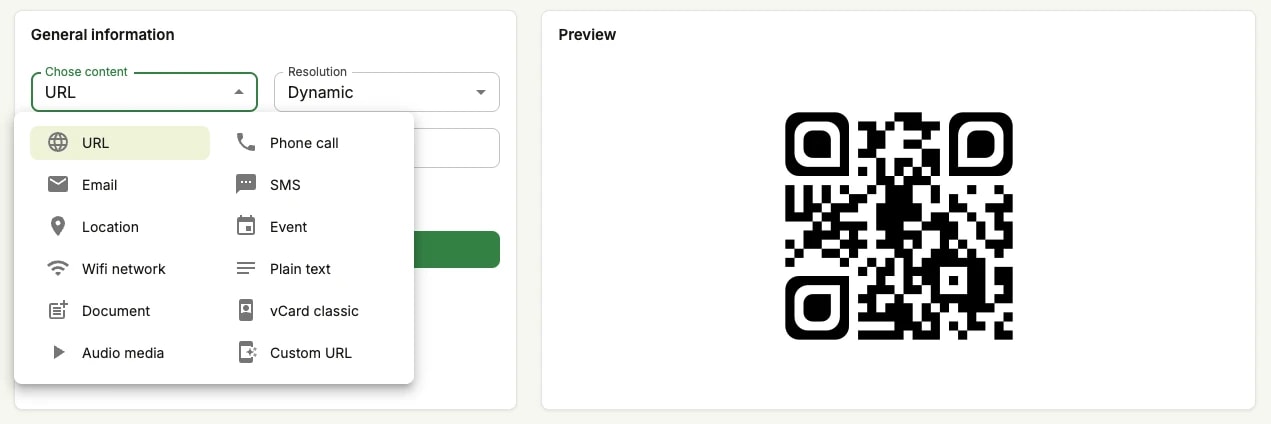
What a QR code encodes is not always a web address. The Chose content list on the generator decides what the scanning phone is handed — a number to call, a message to send, an event to save, a network to join — and each one behaves differently once scanned. Opening a website is only the most familiar of them.
URL
Available as:
The scan opens a web address in the phone's browser. It is the most common content by far, and as a dynamic QR code it lets you change the destination later and collect scan statistics.
Phone call
Available as:
You supply a phone number. The scan opens the phone's dialler with that number filled in, ready to call.
SMS
Available as:
You supply a phone number and the body of a message. The scan opens the messaging app with both prepared, so the reader can send it as is or edit it first.
Available as:
You supply a recipient, a subject and a body. The scan opens the mail app with the draft ready; the reader can still change it before sending.
Event
Available as:
You supply a date, a time and a place. The scan offers to save the event to the phone's calendar, reminder included.
Location
Available as:
You supply a latitude and a longitude. The scan drops that point into the phone's usual maps app.
Wi-Fi network
Available as:
You supply a network name and its password. The scan connects the phone to that network, without anyone having to read the password aloud.
Plain text
Available as:
The QR code carries raw text, shown on screen when scanned. Any message will do, but it cannot be formatted — no bold, no italics, no links.
Document
Available as:
The QR code opens a PDF you upload to Unitag, which hosts the file and serves it to whoever scans. The document can be put behind a password, so it only opens for readers you have given it to — useful for a price list, a manual or a contract you would rather not leave open on the web. Because the file is hosted, this content is dynamic only: there is no static version, and you can swap in a new PDF long after the code is printed.
vCard classic
Available as:
A business card in a QR code: a name, a role, a company, a phone number and an email, which the scanning phone offers to save straight into its contacts. This is the classic vCard format — it remains here for codes that already depend on it, and it is the gentlest way into sharing a contact with Unitag.
Audio media
Available as:
The QR code plays an audio clip you upload — a spoken message, a commentary beside an exhibit, the correct pronunciation of a name. The reader hears it in their browser, with nothing to install. Like Document, it is hosted by Unitag and therefore dynamic only, so the clip can be replaced without touching the printed code.